





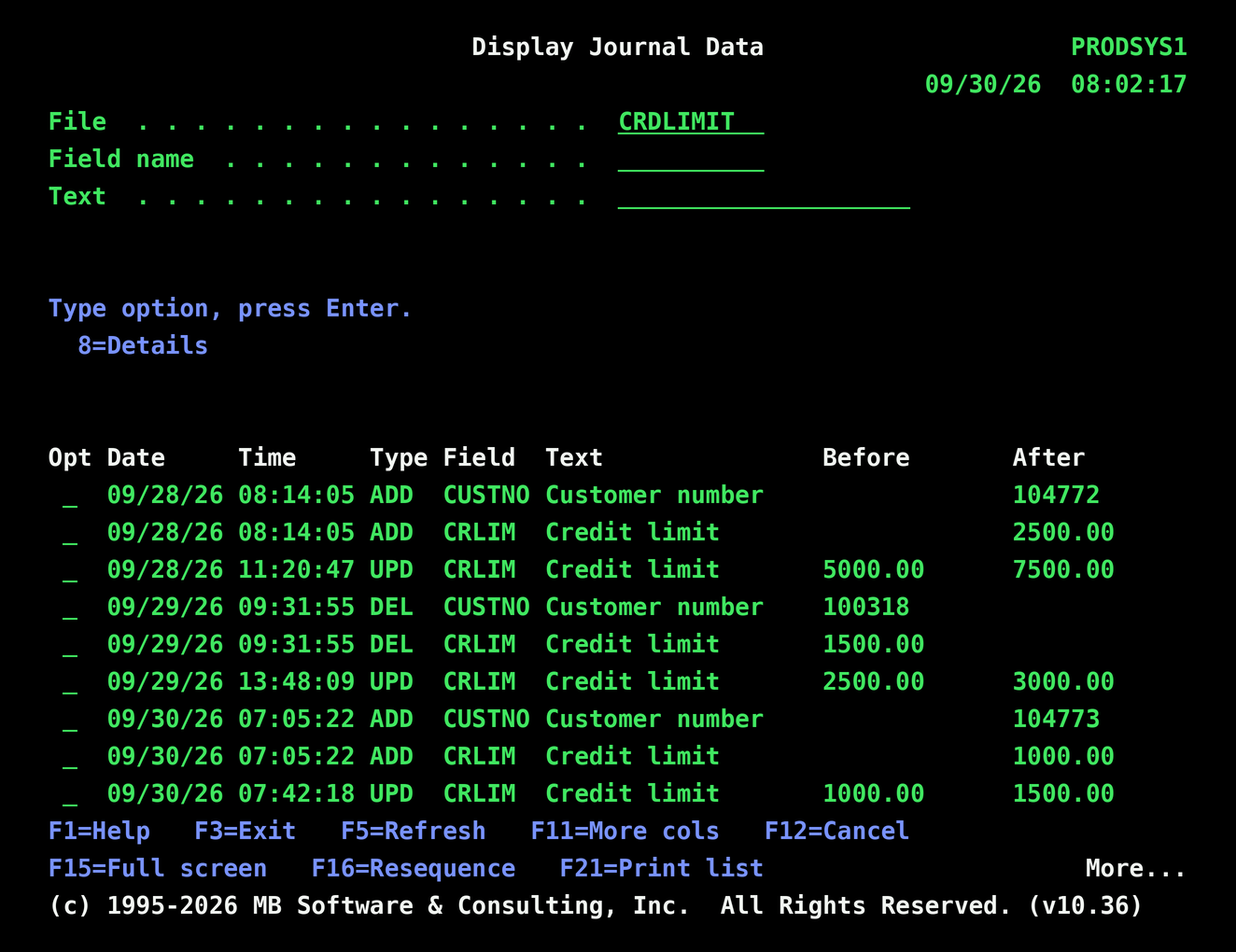
See exactly which fields changed in any journaled file on your IBM i (iSeries, AS/400, System i) servers, with before and after values for every add, update and delete.
The 'Display Journal (DSPJRN)' command from IBM shows journal entries, but the changed data is packed into each entry as one long string. Finding out which field changed, what it was before and what it is now means dumping the journal to an outfile and decoding the record layout by hand.
Our 'Display Journal Data (DSPJRNDTA)' command does that work for you. Enter a file name and it finds the file's journal automatically, pairs each before image with its after image, and lists every changed field on its own line with the field name, its description, and the before and after values. Added records show every field they were written with, updates show only the fields that actually changed, and deleted records show what they held when they were removed.
Filter the list by field name or description, sort it on any column with F16, and take option 8 on any line to see the date, time, job and user that made the change. Narrow the search with the same receiver range, date and time, and job selections as DSPJRN. The results can be shown on screen, printed with OUTPUT(*PRINT), or written to a file with OUTPUT(*OUTFILE). DSPJRNDTA only reads the journal and never changes your data.
Select option 8 from the EZRAD WORKPERF command/menu and copy/paste 'System' serial number and LPAR id into the field below then click the Submit button.